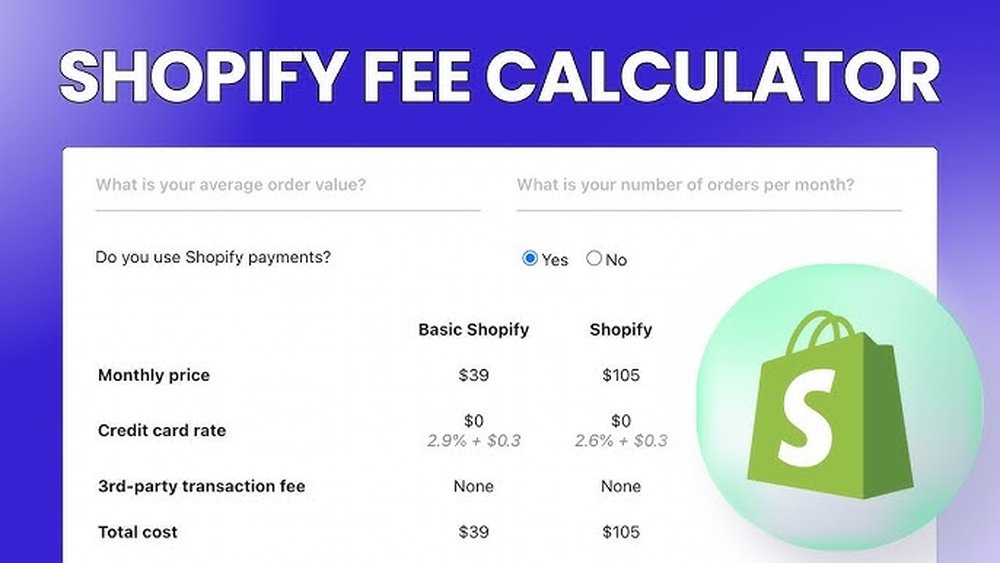

Running an online store on Shopify is popular. But one thing many sellers want to know is, how much do payment fees cost?
Payment processing fees are small charges when someone buys from your store. These fees come from Shopify and the payment methods you use.
Understanding these fees helps you plan your prices well. It also helps you keep more money from every sale.
What Are Shopify Payment Processing Fees?
When a customer buys from your Shopify store, you pay a fee. This fee goes to the company that processes the payment. It is called a payment processing fee.
This fee covers the cost of moving money from the buyer to you. It also covers risks like fraud protection.
Shopify charges different fees depending on your plan and payment methods. The fees are usually a percentage of the sale plus a small fixed cost.
Why Do These Fees Matter?
- Fees reduce your profit from each sale.
- You need to know fees to price your products right.
- Tracking fees helps you manage your store’s money better.
How Shopify Payment Processing Fees Work
Shopify has different plans. Each plan has its own fee rates. Here is a simple view:
| Shopify Plan | Online Credit Card Fee | Additional Transaction Fee (if not using Shopify Payments) |
|---|---|---|
| Basic Shopify | 2.9% + 30¢ per transaction | 2% extra fee |
| Shopify | 2.6% + 30¢ per transaction | 1% extra fee |
| Advanced Shopify | 2.4% + 30¢ per transaction | 0.5% extra fee |
Note: If you use Shopify Payments, you avoid the extra transaction fee.
What Is Shopify Payments?
Shopify Payments is Shopify’s own payment service. It lets you accept credit cards without extra fees.
Using Shopify Payments means you pay only the credit card fee. No extra transaction fees apply.
This can save money, especially if you sell many products.
How to Calculate Shopify Payment Processing Fees
To find out the fee for a sale, follow these steps:
- Know your Shopify plan.
- Check if you use Shopify Payments or a third-party gateway.
- Find the sale amount.
- Calculate the percentage fee of the sale.
- Add the fixed fee (usually 30 cents).
- If using a third-party payment, add the extra fee percentage.
Example 1: Using Shopify Payments
You sell a product for $100 on the Basic Shopify plan. The fee is 2.9% plus 30 cents.
- 2.9% of $100 = $2.90
- Add 30 cents = $0.30
- Total fee = $2.90 + $0.30 = $3.20
You keep $96.80 from the $100 sale.
Example 2: Using A Third-party Payment Gateway
Same sale of $100 on Basic Shopify, but using a third-party gateway.
- Credit card fee: 2.9% + 30 cents = $3.20
- Additional transaction fee: 2% of $100 = $2.00
- Total fee = $3.20 + $2.00 = $5.20
You keep $94.80 from the $100 sale.
Why Use a Shopify Payment Processing Fee Calculator?
Doing these calculations by hand takes time. Mistakes can happen.
A fee calculator does the math fast and right. You enter the sale amount and plan details. It shows you the fees and what you earn.
This tool helps you:
- Set prices that cover fees.
- Compare different Shopify plans.
- Choose the best payment method.
- Plan your store’s budget well.
How to Build Your Own Fee Calculator
If you want, you can make your own calculator using a spreadsheet. Here is how:
- Create columns for sale amount, plan, payment type.
- Use formulas to calculate percentage fees.
- Add fixed fees like 30 cents.
- Calculate extra fees if you use other payment gateways.
- Show total fees and net earnings.
This way, you can test many sales quickly.
Tips to Lower Shopify Payment Fees
Fees take money from your sales. But you can lower them by:
- Use Shopify Payments: Avoid extra fees.
- Choose higher plans: They have lower fees.
- Increase order size: Fees stay fixed per sale.
- Offer free shipping over a limit: Encourage bigger sales.
Remember These Important Points
- Payment processing fees vary by Shopify plan.
- Shopify Payments has lower fees than third-party gateways.
- Fees are a percent plus a small fixed amount per sale.
- Calculating fees helps keep your store profitable.
Summary
Shopify payment processing fees are part of running your store. They affect how much money you keep.
Knowing your plan’s fees and payment method helps you plan better.
Using a fee calculator saves time and mistakes.
Try different prices and plans with a calculator to find what fits best.
Understanding fees can make your Shopify store more successful.
Frequently Asked Questions
What Is A Shopify Payment Processing Fee Calculator?
A Shopify payment fee calculator helps estimate transaction costs. It shows fees charged for each sale made on Shopify.
How Do Shopify Payment Fees Affect My Store Profits?
Payment fees reduce your total earnings on each sale. Knowing fees helps you price products better and plan costs.
Can I Calculate Fees For Different Shopify Plans?
Yes, fee calculators allow input of different Shopify plan rates. This helps compare costs across Basic, Shopify, and Advanced plans.
Does The Calculator Include Credit Card And Transaction Fees?
Most calculators show both credit card fees and Shopify transaction fees. This gives a full picture of your payment costs.

About the Author
Oliver K.G.
Oliver K.G. has 8+ years in pricing strategy and has helped 200+ Amazon FBA sellers, dropshippers, and small business owners optimise their profit margins. He built BizMargin to make gross margin and pricing calculations instant and free. He writes on pricing strategy, gross margin optimisation, and profitability for e-commerce and retail businesses.