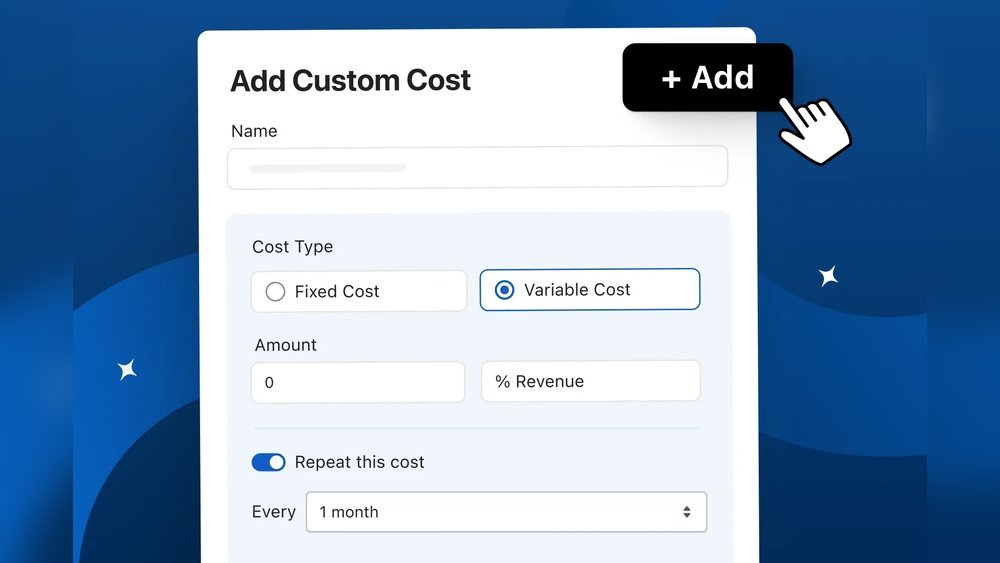
Imagine having complete control over your revenue and costs, tailored exactly to your business needs. What if you could customize every detail to boost your profits and cut unnecessary expenses at the same time?
This new level of customization in custom revenue and upgraded custom cost changes the game. It puts you in the driver’s seat, helping you make smarter decisions that directly impact your bottom line. Ready to discover how this powerful upgrade can transform your business?
Keep reading—you won’t want to miss what’s coming next.
Custom Revenue Features
Custom Revenue Features offer businesses a simple way to track and manage income. They help tailor revenue settings to fit unique needs. This flexibility supports better financial control and clearer reports.
Each feature focuses on ease and accuracy. This reduces errors and saves time. Users can set specific revenue types, dates, and amounts. The system adapts to different sales models and payment methods.
Flexible Revenue Categories
Create multiple revenue categories to match your business. Group sales by product, service, or region. This helps understand which areas earn the most money. Customize labels and descriptions for clarity.
Dynamic Pricing Models
Set prices that change based on conditions. Use fixed, tiered, or usage-based pricing. Adjust prices quickly for promotions or discounts. This keeps pricing accurate and up to date.
Automated Revenue Tracking
Track all income automatically through integrated tools. Sync sales data from different platforms. Eliminate manual entry mistakes and save effort. See real-time revenue updates anytime.
Custom Reports And Insights
Generate reports tailored to your needs. Choose specific dates, products, or categories. Analyze trends and spot growth opportunities. Export data easily for sharing and review.
Enhanced Custom Cost Tools
Enhanced Custom Cost Tools bring more control to your budget planning. These tools help you set costs that match your exact needs. You can adjust expenses easily without confusion. The tools offer clear options to manage costs effectively.
With better cost tools, you avoid overspending. You get detailed views of each expense. This helps you plan smarter and save money.
Flexible Cost Settings
Change your cost settings anytime. Choose fixed or variable costs based on your project. This flexibility fits different business types and sizes. Adjustments happen fast and without hassle.
Real-time Cost Tracking
Track expenses as they occur. See cost updates instantly in your dashboard. This keeps you informed and ready to act. No surprises in your budget at the end.
Detailed Cost Breakdown
View costs broken down by categories. Understand where your money goes in detail. This helps spot areas to cut or invest more. Clear reports make decision-making easier.
Easy Integration With Revenue Tools
Connect cost tools with revenue tracking. See profits after all costs are counted. This full picture supports better financial planning. Workflows become smoother and more aligned.
Benefits Of Upgraded Customization
Upgraded customization brings more control and flexibility to your business. It allows you to tailor products and services to fit exact needs. This means better satisfaction for customers and smoother operations for you.
With improved customization options, you can create unique solutions. These solutions match what your customers want and what your business requires. This helps build trust and loyalty over time.
Improved Customer Experience
Customers enjoy products made just for them. Personal touches make them feel valued and understood. This leads to higher satisfaction and repeat business. Simple custom options can make a big difference.
Greater Efficiency And Accuracy
Upgraded customization reduces errors in orders and production. Clear options help avoid confusion and mistakes. This saves time and cuts down costs. Smooth processes keep the business running well.
Better Cost Management
Custom cost settings let you control expenses more closely. You can set budgets that fit each project or product. This prevents overspending and helps track costs clearly. Smart cost control supports steady growth.
Increased Revenue Opportunities
Offering custom options attracts more customers. People pay extra for products that meet their needs exactly. You can create premium offers that boost sales. More choices lead to new income streams.
Integration With Existing Systems
Integration with existing systems is key to smooth business operations. It allows new tools to work with current software without trouble. This saves time and avoids errors. Businesses can continue their daily work without disruptions. Custom revenue and cost features fit right into your setup. This means less learning and faster results.
Seamless Data Flow
Data moves easily between new and old systems. No manual input means fewer mistakes. Your team spends less time fixing errors. Reports and numbers stay accurate and updated. This helps in making quick business decisions.
Compatible With Popular Platforms
The custom tools work with many common software programs. Whether you use accounting, sales, or inventory software, they fit in. This wide support means no need to change your tools. It keeps your work simple and familiar.
Easy Setup And Maintenance
Setting up the integration is fast and clear. The process uses simple steps anyone can follow. Maintenance is also easy and does not need experts. This lowers costs and keeps your system running well.
User Experience Improvements
User experience improvements make customization easier and faster. They help users control revenue and cost settings with less effort. A smooth and clear interface keeps users focused. This section explains key upgrades that enhance user interaction.
Clear Navigation And Layout
The new design has a simple layout. Users find options quickly without confusion. Menus are organized by task, not by feature. Important settings stand out for faster access. This reduces mistakes and saves time.
Real-time Feedback
Instant feedback shows changes as users edit values. This helps users see the effect of custom revenue and cost immediately. Errors appear right away, guiding users to fix them. It creates confidence and avoids frustration.
Guided Setup And Tips
Step-by-step guides walk users through customization. Short tips explain terms and choices clearly. These instructions reduce guesswork and speed up setup. Users learn without leaving the screen.
Mobile-friendly Design
The interface adapts to smartphones and tablets. Users manage custom revenue and cost on any device. Buttons and fields are easy to tap. This flexibility supports users anytime, anywhere.
Future Prospects For Custom Solutions
Custom solutions continue to grow in importance across industries. Businesses want products and services that fit their exact needs. This demand pushes companies to innovate and refine customization options.
Future prospects for custom solutions focus on improving both revenue and cost efficiency. Advances in technology and data analysis help create better, tailored experiences. These improvements attract more customers and reduce unnecessary expenses.
Enhanced Personalization Through Data
Data plays a key role in creating custom solutions. Companies collect and analyze user behavior to understand preferences. This insight allows for more precise customization. Future tools will use data more effectively to offer unique options to each customer.
Integration Of Ai And Automation
Artificial intelligence helps deliver custom services faster. Automation reduces manual work and errors. Combining AI with customization leads to smoother processes. This means better products with lower costs and quicker delivery times.
Scalable Custom Solutions
Scalability is critical for future custom solutions. Businesses want to grow without losing quality or increasing costs too much. Modern systems allow easy adjustments based on demand. This flexibility supports companies as they expand their custom offerings.
Cost Efficiency In Customization
Reducing costs remains a priority for custom solutions. New manufacturing methods and software lower expenses. Efficient use of materials and time helps keep prices down. Customers receive personalized products without paying too much.
Impact On Customer Satisfaction
Better customization leads to higher customer satisfaction. People enjoy products that fit their needs perfectly. Positive experiences increase loyalty and repeat business. Future solutions will focus more on meeting customer expectations precisely.
Frequently Asked Questions
What Is Custom Revenue In Business Terms?
Custom Revenue refers to tailored income streams designed to fit specific business models. It allows companies to optimize earnings by adapting pricing, sales channels, or product offerings to their unique market needs.
How Does Custom Cost Improve Financial Management?
Custom Cost enables precise tracking of expenses aligned with specific projects or departments. This approach helps businesses control spending, improve budgeting accuracy, and enhance overall cost efficiency.
Why Upgrade To A Custom Revenue System?
Upgrading to a Custom Revenue system provides better flexibility and scalability. It helps businesses respond quickly to market changes and maximize profit opportunities through personalized revenue strategies.
What Are The Benefits Of Custom Cost Upgrades?
Custom Cost upgrades improve expense tracking accuracy and reporting. They help businesses identify cost-saving opportunities and make informed financial decisions with detailed, real-time data.
Conclusion
Custom revenue and custom cost bring new choices to your business. You decide what fits best for your needs. This flexibility helps control spending and increase earnings. Simple tools make it easy to adjust as you grow. Keep track of changes and see results quickly.
This upgrade supports smarter decisions every day. Try using these options to improve your workflow. Small changes lead to better balance and success. Your business deserves this level of control. Start exploring the benefits now.

About the Author
Oliver K.G.
Oliver K.G. has 8+ years in pricing strategy and has helped 200+ Amazon FBA sellers, dropshippers, and small business owners optimise their profit margins. He built BizMargin to make gross margin and pricing calculations instant and free. He writes on pricing strategy, gross margin optimisation, and profitability for e-commerce and retail businesses.