
Are you struggling to figure out if your Amazon FBA business is truly making money? Knowing your profit margin is key to growing your sales and staying ahead of the competition.
That’s where an Amazon FBA Profit Margin Calculator comes in handy. It helps you see exactly how much you’re earning after all costs, so you can make smarter decisions and boost your profits. Keep reading to discover how this simple tool can change the way you manage your business and maximize your success.
Amazon Fba Basics
Amazon FBA (Fulfillment by Amazon) lets sellers store products in Amazon’s warehouses. Amazon handles packing, shipping, and customer service. This system helps sellers save time and reach more buyers.
Understanding the basics of Amazon FBA is key to using the FBA Profit Margin Calculator well. Knowing how fees work and how the process runs helps sellers price products smartly and make profits.
How Fba Works
Sellers send their products to Amazon fulfillment centers. Amazon stores the items safely and prepares orders. When a buyer makes a purchase, Amazon packs and ships the product.
Amazon also manages returns and customer questions. Sellers focus on finding products and growing their business. This hands-off approach saves time and effort.
Key Fees Explained
Amazon charges fees for storage, fulfillment, and selling. Storage fees cover space used in warehouses. These fees depend on product size and storage duration.
Fulfillment fees pay for picking, packing, and shipping items. These fees vary by product weight and size. Sellers also pay referral fees, a percentage of each sale.
Knowing these fees helps sellers calculate true costs. The FBA Profit Margin Calculator uses these numbers to show real profits.
Components Of Profit Margin
Understanding the components of profit margin is key to success with Amazon FBA. Each part affects how much money you make from sales. Knowing these helps you set better prices and plan your business well.
Product Cost
This is the price you pay to buy or make your product. It includes materials and labor. Lower product costs can increase your profit margin. Always track this cost accurately.
Shipping Expenses
Shipping covers the cost to send your products to Amazon’s warehouse. It also includes fees for delivering items to customers. These expenses vary by size, weight, and distance. Keep shipping costs low to protect profits.
Amazon Fees
Amazon charges fees for using its platform. These include referral fees, fulfillment fees, and storage fees. Each fee reduces your profit margin. Knowing these fees helps you price your items right.
Marketing Costs
Marketing costs cover ads and promotions to boost sales. These expenses can include pay-per-click campaigns and discounts. Good marketing increases sales but lowers profit margin. Balance marketing spend with expected returns.
Using A Profit Margin Calculator
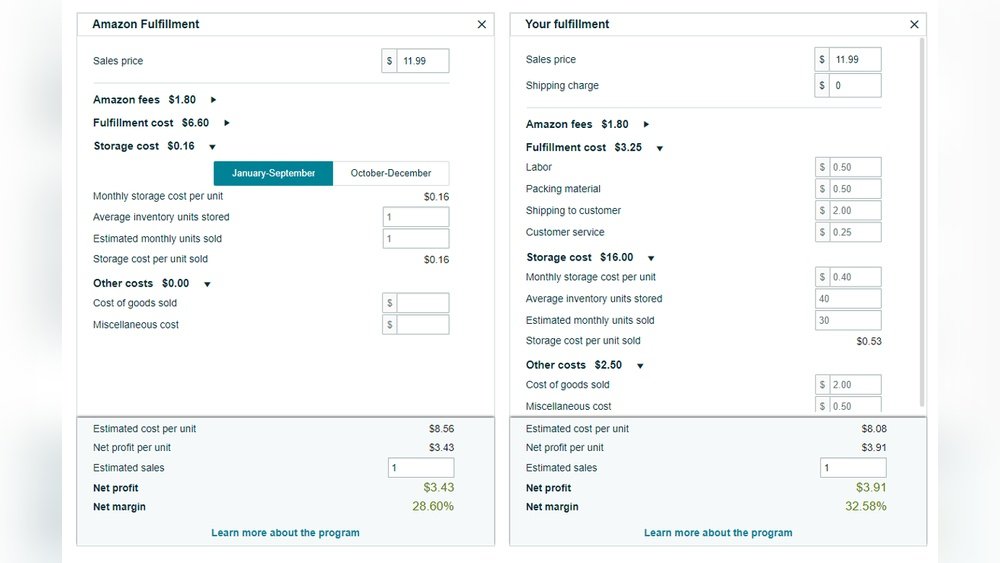
Using an Amazon FBA profit margin calculator helps sellers find the true profit from each sale. It shows clear numbers to understand costs and earnings. This tool makes pricing products easier and smarter. Every seller can see if their product makes money or not.
Inputting Product Details
Start by entering the product’s price. Add the cost of buying or making it. Include Amazon fees like storage and shipping. Don’t forget other costs like packaging or advertising. Fill in all numbers carefully to get correct results.
Interpreting Results
The calculator shows profit and profit margin percentages. Profit is what you earn after all costs. Profit margin shows how much of the sale price is profit. Use these numbers to decide if the product is worth selling. Adjust costs or prices to improve profit margins.
Benefits Of Calculating Profit Margins
Calculating profit margins is key for any Amazon FBA seller. It shows how much money stays after all costs. Sellers can see if their business makes real profit or just sells products. Knowing profit margins helps make smart choices that protect earnings and grow the business.
Pricing Strategies
Profit margin data guides pricing decisions. Sellers can set prices that cover costs and earn money. It helps avoid prices that are too low or too high. Good pricing keeps customers interested and profits steady. Sellers can also test different prices and pick the best one.
Inventory Decisions
Profit margins affect how much inventory to buy or keep. Sellers avoid overstock that ties up money. They also prevent running out of popular products. Calculating margins helps choose which items to stock more. This keeps cash flow healthy and sales consistent.
Common Mistakes To Avoid
Using an Amazon FBA profit margin calculator helps sellers see their true earnings. Many make mistakes that lower profits without realizing it. Avoiding these errors saves time and money. Understand common pitfalls to use the calculator well.
Ignoring Hidden Fees
Amazon charges fees beyond the obvious ones. These include storage fees and long-term inventory costs. Some sellers forget to add these to their calculations. Ignoring hidden fees leads to overestimating profits. Always include all Amazon fees for a clear picture.
Underestimating Shipping Costs
Shipping costs vary by product size and weight. Many sellers guess too low on these expenses. Packaging materials and shipping to Amazon warehouses also cost money. Underestimating shipping lowers the real profit margin. Track all shipping costs carefully before calculating profits.
Top Amazon Fba Calculator Tools
Choosing the right Amazon FBA profit margin calculator helps sellers plan better. These tools show fees, costs, and profits clearly. They save time and reduce errors in calculations. Sellers can decide which products to sell with confidence. Several tools fit different needs and budgets.
Below are some top Amazon FBA calculator tools. They include free and paid options. Each has features that suit various sellers.
Free Options
Many free Amazon FBA calculators offer basic features. They calculate fees, shipping, and profit margins quickly. These tools work well for new sellers or small projects. Amazon itself provides a simple FBA calculator on its website. Other websites also host free calculators with easy interfaces.
Free tools usually have some limits. They may not track detailed costs or taxes. Still, these calculators give a good starting point for many users. They help understand how fees affect profits without any cost.
Paid Solutions
Paid Amazon FBA calculators provide advanced features and detailed reports. These tools include inventory tracking, sales analytics, and cost breakdowns. Sellers who manage many products or high sales volumes benefit from them. Paid solutions often update with the latest fees and policies.
Some paid calculators integrate with Amazon Seller Central for real-time data. They save time by automating many calculations. These tools help sellers plan pricing and marketing strategies better. The price varies, but many offer monthly or yearly subscriptions.
Tips To Maximize Profit Margins
Maximizing profit margins is key for success with Amazon FBA. Small changes can make a big difference in earnings. Focus on smart choices and efficient operations. This section shares practical tips to boost your profit margins. Follow these steps to improve your Amazon business.
Optimizing Product Selection
Choose products with high demand and low competition. Use the Amazon FBA Profit Margin Calculator to check costs and profits. Pick items that are lightweight and small to reduce shipping fees. Avoid products with high return rates or complex regulations. Study customer reviews to find gaps in the market. Select products that allow for a good price markup.
Reducing Operational Costs
Lower expenses to increase your profit margin. Find reliable suppliers who offer better prices. Buy in bulk to get discounts but avoid overstocking. Use Amazon’s FBA fee calculator to understand all charges. Package products efficiently to save on shipping and storage. Automate tasks like inventory tracking to save time and avoid errors. Negotiate better rates with carriers if possible.
Frequently Asked Questions
What Is An Amazon Fba Profit Margin Calculator?
An Amazon FBA profit margin calculator estimates your net profit after fees and costs. It helps sellers price products competitively. This tool includes Amazon fees, shipping, and product costs. It simplifies profit analysis and aids in better decision-making.
How Do I Use An Amazon Fba Profit Margin Calculator?
Enter product cost, selling price, and shipping fees into the calculator. It automatically calculates Amazon fees and expenses. The result shows your estimated profit margin and net profit. This helps optimize pricing and improve profitability.
Why Is Profit Margin Important For Amazon Fba Sellers?
Profit margin shows how much profit you make from sales. It helps assess business health and pricing strategies. A good margin ensures sustainability and growth. Sellers use it to make informed inventory and marketing decisions.
Can This Calculator Include All Amazon Fba Fees?
Yes, most calculators factor in referral, fulfillment, storage, and shipping fees. They provide a comprehensive view of total costs. This ensures accurate profit estimates and avoids surprises in expenses.
Conclusion
Using an Amazon FBA profit margin calculator helps you see real costs. It makes tracking fees, shipping, and expenses clear and simple. Knowing your profit margin helps decide which products to sell. This tool saves time and avoids guesswork in your business.
Try it regularly to keep your profits healthy and growing. Profit margins matter for every seller, big or small. Keep your numbers in check and plan smart moves ahead.

About the Author
Oliver K.G.
Oliver K.G. has 8+ years in pricing strategy and has helped 200+ Amazon FBA sellers, dropshippers, and small business owners optimise their profit margins. He built BizMargin to make gross margin and pricing calculations instant and free. He writes on pricing strategy, gross margin optimisation, and profitability for e-commerce and retail businesses.